Modding a Wyse/Dell D10D (5010) Thin Client to Expand its Storage
2025-11-29 - Also available on Gopher
Recently, I bought a machine that clearly has an identity crisis. It's a thin client from Dell/Wyse (aren't corporate acquisitions lovely?) that can either be called a D10D, a 5010, or even a Dx0D depending on which label or website you read. Mine came with a Wyse front badge [1] and Dell embossings on the sides of the case [2], and the Dell-branded service tag marks it as a model Dx0D, but with a product ID of "D10D 1GF/2GR" an was manufactured in April 2015. As usual Parky Towers has in-depth details on it [3]. This 27 euros thin client was bought simply because it was cheap and I love having spare thin clients to play around with, although from the time I bought it to when it actually got delivered, I had an idea of having another Windows Server machine on my network to act as a SQL Server database server to store random things I might want, specially if paired to Microsoft Access using Linked Tables [4], I can have all the power of SQL Server paired to the ease of use, and awesome form designer or Access, although I might swap the HP t5740 I'm currently using to host this content [5] for it, since having "such a powerful machine" for this purpose seems a bit overkill to me. Upon the machine arriving, I was quick to buy all the necessary bits to upgrade its storage, something that you should do to every single thin client, since they always come with very small Disk-on-Module (DOMs) flash drives. Mine came with a mere 2GB of internal SATA storage.Upgrading the Internal Storage ------------------------------
This was a lot more painful then I originally intended. Before even getting the machine and upon seeing some photos of its internals [6], I decided to buy an mSATA to SATA adapter from Amazon that looked like it might fit [7]. Eager to start hacking on the machine, I opened it up and installed the mSATA adapter, only to discover that it didn't fit:Although, as can be seen in the pictures, it's hitting the RAM socket. Thankfully the area of the adapter's board that's interferring with the RAM socket only contains a ground plane [8] on both sides of the board, and what looks like a fiducial mark [9] on both sides, all things we can safely cut out. So I quickly made some marks with a sharpie, got the adapter in a vise, and started filling the corner off until it would fit in the motherboard:
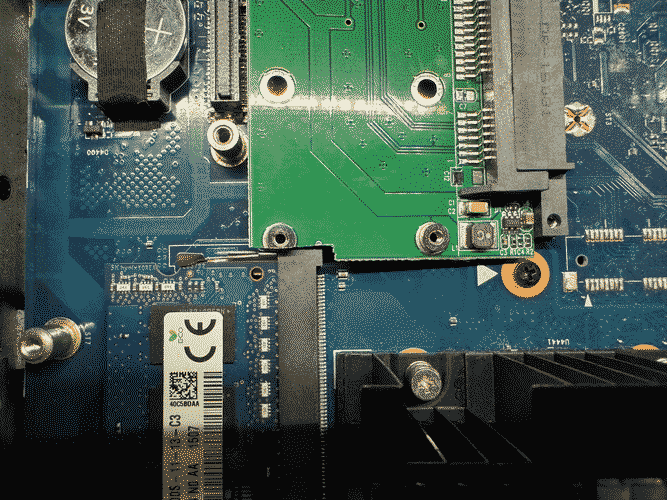
The problem now was that, differently from Parky Tower's motherboard photos [3], which showed the ST0 standoff not populated [10], mine had that inconvenient standoff nicely soldered to the board, meaning it interfered once again with my adapter:
After a lot of flux, leaded solder, desoldering braid, and the help of my trusty PortaStation [11], I was finally able to liberate the ST0 standoff from its pad, and was finally able get my mSATA adapter properly seated on the motherboard:
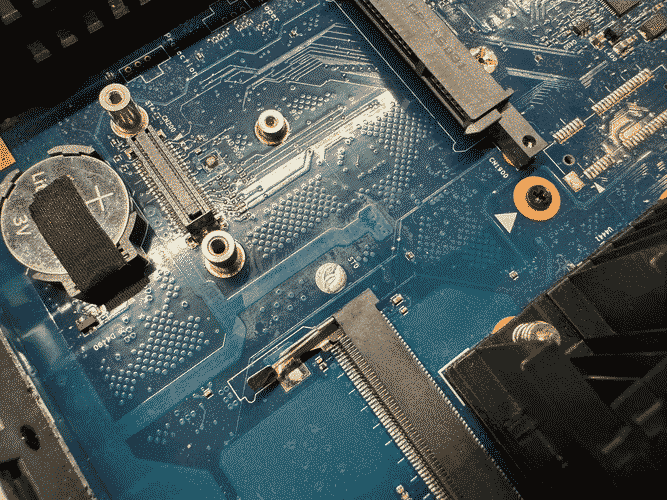
After all this trouble I was finally able to get to a point where I could install an operating system to this machine, although looking at it now, maybe I could've just used a SATA extender cable and dangled a regular 2.5" SSD inside the case, just like I did with my HP t5740 [12].
Installing Windows Server 2012 R2 ---------------------------------
Before any operating system got installed into this thing, I ensured that the BIOS settings were set to sane defaults, that the clock was right, and that the machine was set to boot from USB. In the case of this thin client, it was literally a BIOS, since I saw no mentions of UEFI anywhere. Getting to the BIOS gave me a small scare when, upon mashing DEL on startup, I was greeted to a BIOS password screen. I tried the classic "Fireport" (with a capital F) [14] and it promptly got me into the BIOS setup screen. [1]: http://nathancampos.me/log/2025-11-29_wyse-d10d-mods/wyse-d10d-front.JPG [2]: http://nathancampos.me/log/2025-11-29_wyse-d10d-mods/wyse-d10d-side.JPG [3]: https://www.parkytowers.me.uk/thin/wyse/d/d10d/ [4]: https://support.microsoft.com/en-us/office/import-or-link-to-data-in-another-access-database-095ab408-89c7-45b3-aac2-58036e45fcf6 [5]: gopher://nathancampos.me:70/0/occ/2025/day4.txt [6]: https://www.parkytowers.me.uk/thin/wyse/d/d10d/mods.shtml [7]: https://www.amazon.es/dp/B0BVMCD1HX [8]: https://en.wikipedia.org/wiki/Ground_plane [9]: https://www.pcbway.com/blog/PCB_Manufacturing_Information/Fiducial_Mark_PCB_Knowledge_542b3c29.html [10]: https://www.parkytowers.me.uk/thin/wyse/d/d10d/imgs/flash_pcie.jpg [11]: http://innoveworkshop.com/product/portastation [12]: gopher://nathancampos.me/I/occ/2025/day4/DSCN2968.JPG [14]: https://www.dell.com/support/kbdoc/en-us/000128600/dell-wyse-hardware-what-are-the-bios-passwords


